Showing posts with label Maureen Shelley. Show all posts

Thursday, 18 December 2014

Six Things You Can Learn From Our Growing Business


Growing a business isn't easy. And it doesn't happen overnight. CEO Dominique Antarakis (@dantarakis) and COO Maureen Shelley (@MaureenShelley) share the six things they've learned from growing their small business, The Copy Collective. From the people, the clients and the inspiring work - they're privileged to do what they do... and they want to thank YOU for making 2014 a great one.

Number 6. It takes about two years to become an overnight success.
That may sound like a funny thing to say but success in business (which I’m equating to profitability, year-on-year growth, solid reputation and repeat business) takes time. You can be a very smart single operator – like my business partner Dominique was before I bought into The Copy Collective – but that in itself doesn’t make a successful business. There is a different skill set you need to develop and we’ve both been working hard to improve our existing skills and gain more in order to keep growing our business.
Business is hard. It takes commitment, communication, cooperation and compromise. If you are in business, expect that laying the foundations for all of those “C” words will take some time to pay off. In my experience, it’s about two years.
Number 5. Pay yourself – something
In 2012, when I joined The Copy Collective full time, we decided right away that we would pay ourselves wages. We weren’t going to take drawings, we weren’t going to see what was left at the end of each month and take that – we set a wage and we paid it. Now, we could probably both earn more if we went and worked for someone else but we’re growing a business and there is tremendous satisfaction in that. We can now see – after a lot of hard slog – that next year that we will be able to pay ourselves more and maybe even have a tax problem.
I contrast this to other business owners I know who take drawings, not wages, who don’t have a regular amount that they can rely on (even a small regular amount) each week or fortnight. I see them getting resentful about all the effort they put into their business. I see them making silly decisions and taking too much money out because they “deserve” it. I’m so grateful to our business mentor Jon Isaacs who has provided steady counsel along the way. Paying ourselves was one thing he advised.
Number 4. Keep your accounts up to date
I had a long chat with a client this year who was about $7000 behind in payments to us, which was unusual for them. The client acknowledged the debt, said that there wasn’t an issue with paying it but they just hadn’t had time to “do the books”. “The books” were an Excel spreadsheet and it took about three days of this client’s time to “do the books” each month. Business had been good and they hadn’t had time to sit down with Excel and pay suppliers like us. I advised them to use Xero, a subscription accounting system developed by some very smart Kiwis.
We used to have an accountant-run system, which was great until we wanted to know how we were doing. We had to ask for monthly reports to be run, to get P&Ls, for our BAS (and if you don’t know what these acronyms are – you need to know, so go find out) and pretty much anything else. This system didn’t cover payroll, didn’t include super and cost about $400 a month. Xero costs us $60 a month and we can run any report we want, any time we want and we have absolute transparency about our cash flow, profitability and who we owe money to and how much.
Number 3. Automate, automate
We used to have someone chase our debtors and it took about two to three hours (at least) a week for them to chase up late payers. We subscribed to Debtor Daddy for $15 a month and that person now has a lot more time to focus on other things as the software automatically sends reminders to clients as their bills become overdue. We also connected Debtor Daddy to Xero and Xero to Salesforce (our CRM) and this year we’ve installed Breadwinner to bring all that financial data into Salesforce. We can now see who our biggest clients are, who our most profitable clients are, which clients take up most of our time, and which clients take up most time and return the least profit. Automation is transforming our business and enabling us to serve our best clients better with the same number of staff, and to look after our less-profitable clients too.
Number 2. Keep learning
We’ve all attended extensive training and development conferences, workshops, seminars, webinars and even signed up for email courses this year. We’ve found new ways of doing old things and found some new things to do along the way. By constantly learning, we’re improving our skills all the time and are better able to focus on our customers.
Number 1. Cut yourself some slack
I was so heartened to hear Mike Cannon-Brookes of Atlassian say at the Start-Up Conference, earlier in the year, that some days he broke every rule in the business play book and nothing went right. He said that he would say the wrong thing in meetings, do the wrong things in the office, not pay attention when he should and pay attention to things that weren’t his concern. He said he would go home thinking “what an idiot”. Then he’d go back to work the next day and somehow, things would be better and the business survived. It was great to hear Mike say that because some days I just can’t seem to get anything right. Those days are hard but it’s good to know that even very successful entrepreneurs like Mike Cannon-Brookes have those days – and he’s got a $1 billion business.
One more thing – enjoy your successes. We’ve enjoyed some great success during the past 12 months thanks to our amazing team – our staff and our talented writers – and thanks to our exceptional clients. We’re privileged to work with some of the greatest organisations in the country – people who are literally working to save the planet, and make it a better place for us all.
Dominique and I would like to thank everyone at The Copy Collective for a mighty year. We look forward to seeing you and hearing from you next year. May the joy and peace of the season be with you, your family and friends.

Sunday, 7 December 2014

Ten Simple Steps to become a successful published author

You've finally written your masterpiece. You've done it. You're an author... But how will people read it? Well, Red Raven Books can help. Maureen Shelley shares the final post in her Blog series “10 Simple Steps to becoming a successful published author.”


Here's the final steps of what you need to do:


1. Call The Copy Collective and a Red Raven Books' editor will be assigned to collaborate on your manuscript.
Select how much you want to spend, what you want us to do and what you are prepared to do for yourself. You can stage your process so it suits you and you can pay over a period of time as each service is completed.
This is a fee-for-publishing service. You retain final control. You keep all the proceeds of your sales.
2. Select your package - you can choose some or all. Packages start at $870 through to a full print production with assistance at every step:
  •   Editing.
  •   Proof reading.
  •   Book cover design and selection.
  •   Print-ready manuscript (editing and/or proofing & typesetting) + ISBN + barcode.
  •   Digital-ready manuscript (for Amazon (Kindle) & iTunes (iBooks) & Google Play.
  •   Book app - Android and iOS.
  •   Print management - typesetting, printer liaison (Australia), proofs & delivery.
  •   Registration and lodgement to comply with the Copyright Act (1968).
  •   Marketing plan - social and traditional media, registration with book distributors.
3. Work with your editor during a 4 to 6 week period to complete your draft manuscript.
4. Get the technical bits right: typesetting and design, including digital file preparation.
5. ‘Print’ execution: send to printers or submit to publishing platforms.
6. See your book in print, in the App Store or on Google Play. 
7. Manage your launch/celebratory event, first conference presentation or elaunch - including media coaching, photography and support.
8. Digital media campaign - microsite development, Twitter, Facebook, LinkedIn, Google +, Google Analytics, Facebook Insights, TweetReach, CRM registration and HootSuite scheduling, plus eDM, GoodReads and genre sites registration and reviews.
9. Traditional media campaign: media releases, registration on news sites for Google News indexing, book tours.
10. Start working on your next manuscript.

Red Raven Books is the publishing and imprint arm of The Copy Collective. Find out how we can help you today.

Friday, 8 August 2014

Selecting your publishing platform for your next book (Part 8)

You’re almost there! You’ve written the work, laid it out and now you need to get it out. But how? Maureen Shelley shares her research on publishing platforms in part 8 of Blog series “10 Simple Steps to becoming a successful published author.”


Print, digital or POD?

Once, it used to be easy. You could print or you could go digital. Now, you can print, go digital, go a bit each way with short print runs and print on demand (POD). Do it yourself, contract it all out, contract out a bit or contract a lot. It is up to you. Never have so many people been publishing books and never have there been more choices available to the would-be author to get their manuscript before a reading public.

Printing in Australia

We use and recommend Griffin Press in South Australia. They are a traditional printer with some extras for small publishers (like us), self-publishers and big publishers. People always want to know what it will cost to print their book and the answer is "it depends". It depends on book length, size, paper chosen, cover stock chosen - even the size of your margins can make a difference (larger margins equals more pages). 
A screen capture of the "Request a Quote" page at griffinpress.com.au
Self-print options available at Griffin Press. Source: www.griffinpress.com.au

So let’s say you have 
  1. 316 pages 
  2. in a Trade B format paperback 
  3. with gloss cover (matte is more fashionable but it scratches more easily)
  4. with book cream pages 
For 1000 books that will cost you around $5 a book.

Now, you can get a quote out of China for about $2 a book for the same format manuscript, however it will cost you $3 a book to ship it to Australia. That will still cost you around $5 a book.

It will cost you more if you want proofs rather than just checking a PDF file and it will cost you more if you ship stock to more than one "drop" (address).

You then have to store your books where they won’t absorb damp, smells (cigarettes, open fires, factories etc), or be attacked by insects or rodents (so maybe not the attic, basement or garage - unless they are clean, dry, airy vermin-proof areas). 

If you must store your books in the garage, put your cartons on a plastic pallet - they at least won’t absorb damp from the ground. You can buy plastic pallets from eBay or Gumtree.

Our recommendation is to print in Australia if you have a ready-made audience. If you are well known - even if it’s in your own niche - you have an audience already. If you then market to that audience, you should get sales and hopefully can move 1000 books inside of a year.

The books that sell the most in Australia are children’s books (however, they tend to have a lower cover price so the authors may earn less than writers for the general market with a higher price) and tie-ins to movies and TV programs (good luck with that). 

Female authors tend to do better with cookbooks and diet books, unless you are Mem Fox or writing romance novels. Andy Griffiths probably sells more books in Australia than any other Australian author but they’re cheaper so Andy may not earn quite as much as Matthew Reilly (I don't actually know, this is a guesstimate based on reported sales).

If you write a book that can be used in schools, you will have a much better chance at success. Around half of Australia's reported $2 billion+ publishing industry is for publications in the education sector.

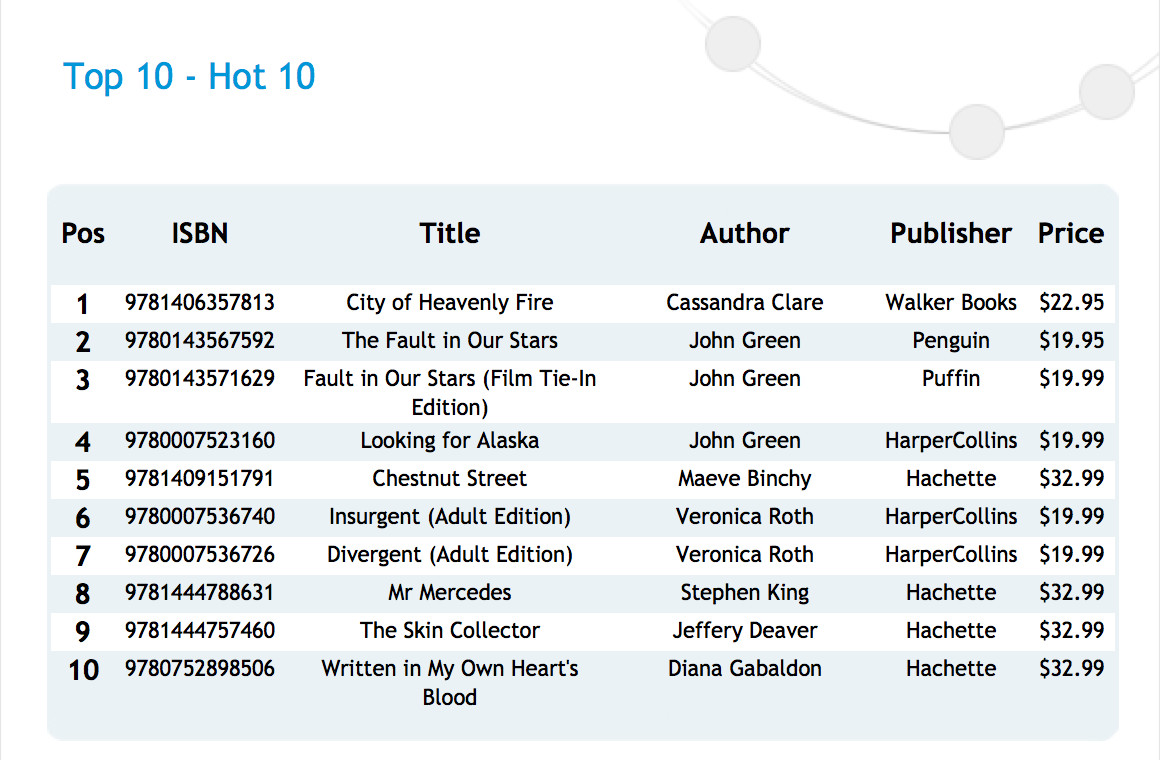
You can view monthly top seller lists at Nielsen BookScan to get an idea of what is selling locally, who is writing them, and the retail price at local book shops.

A screen capture of the "Hot 10" page at nielsenbookscan.com.au
Top 10 selling books in Australia, retrieved 1 August 2014. Source: www.nielsenbookscan.com.au/

So, if Andy, Mem and Matthew are selling (say) 40,000 books each, you can expect to sell 400. If you have an audience or have created an audience, you may sell a print run of 1000. A best seller in Australia is 3000 sales or better.
Let's say your book will cost between $5000 and $10,000 to produce 1000 copies:
  • $5 to print the book 
  • plus up to another $5 per book in editing, proofing, design, typesetting, and other expenses
Of those 1000 copies you may sell 400 for $19.95. So your $5,000 to $10,000 investment will net you $7,980. 

However, you could be the author that sells 990 of your 1,000 print run (10 copies for deposit at the National Library of Australia, some sold through marketing, and the copies your mum buys for Christmas presents) and you’ve made between $9750 and $14,750 profit. Start to do that twice a year and you have the beginnings of a new career.

In addition to sales, your book may also be purchased by public libraries and the Public Lending Rights (PLR) scheme may apply. If you strike gold and your education-related book is picked up and used as part of the National Curriculum, then the Education Lending Rights (ELR) may also kick in. These schemes are administered by the Ministry for the Arts, a part of the Australian Attorney General’s Department. Guidelines can be found at the Ministry for the Arts webpage.

Your decision to print should be carefully weighed. On the one hand, you are taking a risk. However, you will control your sales and distribution and, if you are a self-published author all of the money from sales (less your costs) is yours to keep. If you do want to print in Australia, then Griffin Digital can do short runs if you don't want to commit to more than 500 books.

Digital

Using a digital format to produce your books is a no-brainer. There really isn’t a good reason to not produce a digital version of your book. The difficult part is to decide what formats to publish in and whether you will do it yourself or contract out part or all of the effort. I discussed preparing your digital file in Part 7 of this series.

PDF

A PDF is the easiest, simplest and cheapest form of digital publishing available to you. You can write the book yourself, use an online program to undertake editing or proofing (some are even free to use) and you can then convert your manuscript by printing to PDF in your word processing program. 
You then have an ebook that you can give away, send to people who subscribe to your blog or sign up on your website (assuming you are marketing some other product), or upload to a platform such as Scribd. If you give away your book, you can upload to Scribd immediately. If you want to sell it, you will need to go through one of their digital publishing partners: 

SmashWordsINscribe DigitalBookBabyDraft2Digial

If you have ecommerce on your website, you can take payment for your book and provide the PDF as a down-loadable file once payment is made.
You can also sell your PDF ebook through platforms such as those used by Scribd or through Vook or IngramSpark.

Conversion and distribution platforms
If you don't want to convert your Word doc to an ebook version yourself, there are platforms that will do it for you. This is a small selection but they offer some of the largest distribution networks with up to 39,000 outlets around the world.

Popular conversion/distribution platforms
Platform
Your share
Fees
60% of list = 85% net royalties
$0 to $249+, cover design $149 - $279
100% of net royalties
Free basic package, premium packages from $49 to $349. Booktango is part of AuthorServices, which is a division of Penguin Books.
60% of list = 85% net royalties
No fees but retain 30% for US tax if not from US unless a signed W8-BEN form is lodged (Australia & NZ have tax agreement with US), free ISBN
??
“flat fees per title distributed & a small revenue share per title sold”
40% of list/agency price
$25-$49 per eBook plus $12 per title per year - dearest but also can be paired with POD (print on demand); it also distributes to the most outlets
60% of list = 85% net royalties
No fees, free ISBN
60% of list = 85% net royalties
No fees

Free conversion tools
There are tools that allow you to convert your word processing file to the popular formats for free. They tend to be a bit fiddly but if you have the time and are prepared to be patient, then you can convert your files yourself and upload to the popular stores yourself:
  • Amazon, for Kindle - still the category killer
  • iTunes - Apple's iBooks are getting more popular
  • Google Play - PDF, ePub or .ASCM (Adobe's format with DRM)
You will want - as a minimum - a version for Kindle AZW, iTunes (ePub) and Google Play. You may also want versions for Sony LRF, eBook FB2, Microsoft LIT, and TCR (Symbian platforms). 

The Calibre open source program can be used for DRM-free (digital rights management-free) books and you can use the free converter at Online Convert to produce most popular formats. Both these sites request donations. Online Convert has a paid premium service as well. Zamzar also converts one ebook format to most others and is a free service.


Direct digital services

Amazon really created the ebook market. The Kindle (love it or hate it) is still the best-selling e-reader and some authors make a living through just listing with Amazon. If you choose to publish exclusively with Amazon you will earn higher royalties (70% net instead of 60% or less). Publishing in the Kindle format is complicated (I've done it) but Amazon have excellent resources for self publishers. 
If you just want to publish in iTunes and your books need colour images, then I would recommend using iBook Author. It is free but you will need a Macintosh computer. Apple provides excellent resources for the self-publishing author but if you publish directly with Apple you can't sell your book anywhere else. You can give it away, though. Authoring with the iBook Author is a “drag and drop” experience, particularly if you have multimedia that you want to include.
Apple - Book Creator (for iPad) ($6.49)
If you don't have a Macintosh computer but still want to publish directly to iTunes, you can use an app on an iPad called Book Creator. It will produce a reasonable book that can be published to the iTunes store and will be available for sale or distribution. It is better for short books such as picture books for children or self-help books (not so much for 52,000 word novels) and you can incorporate both video and audio into your book. More than 5 million books have been published with Book Creator, so it is well worth trying.
To publish directly with Google Play you need to create a Google Partner Account. Google accepts PDF and ePub formats and provides a step-by-step process for authors and self-publishers. After establishing your account and sorting how you'd like to be paid and where you’d like to sell your book, you can list your book in Google's book catalogue, set your price and distribution and then upload the book.


Print On Demand (POD)

Print on demand services enable your books to be listed as “in stock” or “available now” in online stores. There are a lot of POD services out there. I'd recommend you look at three: Lulu, Blurb and IngramSpark.
Lulu has been in operation since 2002, which is a long time in the POD space. Lulu lets you set up your account for free. It has a slightly different take on fees. Lulu takes a “base price” deduction from your RRP (the cost of producing the book), as well as a “share”. However, it claims that authors receive more net than if they print with Amazon, Barnes & Noble or Ingram. These three publishers all charge less to produce the book but they have higher distribution fees. While the POD prices for Lulu are reasonable (about $10 a book), in the past shipping was a killer and often left a book costing as much or more than it would cost to print in Australia. However, Lulu now have print facilities in Australia and this is less of a problem.
While the Blurb POD book costs more (about $11 to $12 for a 200-page book printing 1000) it allows for much more flexibility than the usual self-publishing service. You create one file and Blurb converts it to PDF, fixed format ebook and POD book. You can sell through Blurb, your own site or Amazon. This is a great platform for photo books, coffee table books, art books or similar. If you want a straight black print on book cream paper, there are cheaper options but perhaps not those that are as easy to use or as flexible.
While IngramSpark is probably one of the most expensive options it also has the greatest reach. You can produce an ebook and a POD book through Ingram. If you produce your eBook and POD book at the same time, the set up fee is $49, however, if you order 50 books for your first print run the $49 fee is refunded. If you print 50 books of the one title and ship to a single address, the $49 is recredited to your credit card. If you choose IngramSpark, your book (eBook and POD) will be available in 39,000 outlets. That is as good as it gets. What you need to decide is whether you are prepared to put all the “publishing” in the hands of one partner and collect a lower net revenue or whether you want to do more of the leg work and receive a bigger share of your list price.


Personally, I think that it is better to put more of your time into marketing your book than distributing it so my recommendation is to go with IngramSpark. 

If you work with a company such as ours, we would put it through the publishers’ equivalent Lightning Source (also owned by Ingram, which is a big US publisher).


Red Raven Books is the publishing and imprint arm of The Copy Collective. Find out how we can help you today.

Tuesday, 22 July 2014

Let’s Get Technical: Preparing your digital file (Part 7)

Maureen Shelley turns technical in Part 7 of Blog series "10 Simple Steps to becoming a successful published author", on preparing your digital file.


The good news about digital files is that the ebook format takes care of all the extra formatting that are required in a print-ready manuscript. The bad news is that you have to take it all out: all those extra section breaks, foot notes etc you put in for your print book - they all have to come out. This is where you will thank yourself for using the inbuilt formatting available in word processors. 

Less is more:


Remove all section and page breaks, all foot notes and end notes, remove all underlining.
      ✎ If you want to emphasise a point use italics, not underlining. 

        Remove the table of contents and page numbers. 
            ✎ Leave in your chapter headings. 

              Remove any hidden commands. 
                  ✎ The long dash in Word is an example: some digital programs don't deal well with these so use short dashes or change your punctuation. 
                  ✎ Apostrophes are another punctuation mark that can cause issues. You may have seen a question mark in some digital files; it is usually in the place where an apostrophe would be.

                    Remove all blank pages. Remove all notes pages.

                      Your file should be continuous (no separate pages; the text should flow on) with your title page, frontispiece, the introduction and your body copy.
                           
                          It may be tempting to save your file as a text file to get rid of all the formatting. This is a temptation you should resist, as it will only create additional issues, such as having to replace all the chapter headings' format.  

                          A stack of four hard-cover books are connected to a laptop with a USB cable.
                          If only it were this easy. Source: http://donnielight.files.wordpress.com/

                          Ebooks aren't necessarily great places for tables and graphs. You may need to convert these to JPEG files. Then you will need to embed your images or convert them to outline files remembering to save them in the correct format if they are in colour. Your ebook platform will have specific instructions on each of these steps.

                          Hyperlinks need to be formatted differently for ebook versions, so if you include them read up on how to do it. There are plenty of digital publishing blog sites, so search and you shall find.


                          There are about 40 digital formats 

                          Graphical Logos for eBook Formats and Standards: Amazon Kindle, HTML5, Sony, Adobe PDF, Barnes & Noble Nook, .mobi, ePUB
                          Source: newepublishing.com
                          and epub is the most widely used. However, as a self published author you will want to get onto Amazon and the Kindle uses proprietary software. Also, Apple's iBook store uses a modified epub (it has different cascading style sheets or CSS), so you may need at least three versions of your ebook.

                          Storyist is great publishing software that lets you create manuscripts (and screenplays) and convert them to popular digital formats. I recommend you investigate your options. When you upload your manuscript you will need two PDFs: one for the cover and one for the body copy.

                          There are dozens of ebook publishing sites and platforms. They will convert the file for you and publish to thousands of outlets. However, they will also manage your sales (which could be a good thing) and you will get the proceeds. Expect to receive between 30 and 50% of the RRP or recommended retail price.

                          Another way to publish is simply to use a PDF file, thereby avoiding formatting challenges. Scribd will publish PDFs and Scribd has a very large readership, or you could chose to have a downloadable file from your own website; that way you don't share your sales with anyone.

                          You will need to decide whether it is better to have all the money and fewer sales or less money on more sales. If you have good traffic to your website - say 2 to 3 million visitors a month - then by all means publish only on your own site.

                          You will need a separate ISBN (International Standard Book Number) for your digital manuscript and a separate National Library entry for the digital format. You will not need a barcode. If you publish on Amazon, you will be given their equivalent of an ISBN.


                          A last word on digital files: use the strengths of the format. 


                          Graphic with text: "Thankyou for reading. We invite you to share your thoughts and reactions". Button links to social media sites are arranged below the text.
                          Source: http://www.thebookdesigner.com/
                          You can add social media buttons and links, links to your GoodReads review page or Amazon listings for your other books - all from within your manuscript. It makes sense that if someone has just read your book, they may want more or they may tweet about it. Don't stand in the way of your readers doing your marketing for you. Read up on the HTML codes to insert these buttons into your manuscript. It could be well worth it!

                          We will publish a list of sites for self-published authors at the end of this series or you could just Google it if you don't want to wait.

                          Red Raven Books is the publishing and imprint arm of The Copy Collective. Find out how we can help you today.
                           

                          Wednesday, 16 July 2014

                          Let's Get Technical: Preparing Your Book’s Print File (Part 6)


                          Maureen Shelley turns technical in Part 6 of Blog series "10 Simple Steps to becoming a successful published author", on preparing your book’s print file.


                          The least pleasant part of writing a book is preparing the file for the printer or digital publication. I recommend you save yourself a whole lot of pain and angst and send the file to a professional typesetter to do the job for you. 

                          Pic source: FaceGFX
                          If you have budgeted for nothing else, budget for a typesetter. 
                          Google typesetters in your area and send off your file and get back a nice PDF that has everything done for you. 
                          Most authors don't try to design their covers, yet many believe that they can do the work of a typesetter. 

                          What you need to provide if you're going to attempt it yourself:
                          • You will need to provide two files to your printer - one PDF for the cover and one PDF for the manuscript itself. 
                          • If you don't understand any of the points below, please consult Google as there are a myriad of resources available to the self-publishing author and most are available for free.

                          The Cover file for the printer:

                          • Send the checklist of the printer's requirements to the graphic artist who designed your cover. 
                          • They will follow the instructions and send you back your cover with embedded fonts or with the fonts outlined. 
                          • They will also supply the PDF in the correct format for printing, particularly if you have a full-colour cover. The details below are for the body copy file only.

                          The body copy file for the printer must have:


                          • Embedded fonts - all fonts are to be embedded, this is why I recommend Times New Roman and the use of one font only
                          • Mirror margins
                          • If the book is more than 150 pages, the right margin wider than the left (gutters)
                          • Manuscript margins (these are wider than standard)
                          • The correct leading and spacing that is consistent throughout
                          • The number of pages in the manuscript is exactly divisible by 16
                          • If the pages aren't divisible by 16 you have added  blank pages at the end
                          • If you have blank pages, there are fewer than 10 blank pages
                          • If there are more than 10 blank pages, you have typed 'notes' at the top of each
                          • The last page blank,
                          • The introduction and the first chapter start on right-hand pages
                          • The dimensions of the 'pages' are equal to a standard paperback form such as Trade B, B+ or C
                          • All options of the 'printing' of the file to PDF are changed so the page size remains the same at Trade B or C or what size you have chosen
                          • Section breaks, so you can change the page numbers before the Introduction to Roman numerals
                          • Page numbers after the introduction or Chapter 1 starting with Arabic numbers
                          • The file is 'printed' to PDF not 'saved as' a PDF from  Word
                          • Each page set so when the file is 'printed' to PDF the words don't move to the next page - resulting in changes in format and more pages than originally desired
                          • Standard headings used by your word processing program
                          • A table of contents created by your word processing program
                          • No extra spaces or paragraph marks - not one! Extra spaces and par marks can create havoc when files are converted to PDF and fonts are embedded
                          • Word processing commands for paragraphs (Ctrl (or Ctrl) in Word on a PC) - not the 'enter' key hit twice
                          • Uniform paragraph spacing - not the 'enter' key hit twice creating greater leading after 14pt letters as compared to 11pt letters
                          • Consistent spelling - chose Australian English as the review language and apply it to the whole document; unless your market is the US and then apply US spelling to the whole document
                          • Numbered chapter headings
                          • Spell checked - one last time
                          • A frontispiece - this sets out the requirements under
                            the Copyright Act (1968), provides details of the author, printer, publisher (if any), the ISBN, whether the book has been catalogued at the National Library of Australia, a statement that the author is asserting their moral rights, a copyright symbol next to the author's name and details of the edition (1st, 2nd, Australian etc). Look at recent books in your genre to see how these are laid out.

                          Red Raven Books is the publishing and imprint arm of The Copy Collective. Find out how we can help you today.